You cannot select more than 25 topics
Topics must start with a letter or number, can include dashes ('-') and can be up to 35 characters long.
 Fernando Martinez Valenzuela
f305f9d7be
Fernando Martinez Valenzuela
f305f9d7be
|
4 months ago | |
|---|---|---|
| data | 4 months ago | |
| images | 4 months ago | |
| sensors/HTU21D | 4 months ago | |
| C8ZLtB-py-basic-ui.jpg | 4 months ago | |
| README.md | 4 months ago | |
| RaspberryPi4_PinMap.jpeg | 4 months ago | |
| TZCBIN8qL-HTU21D-Module-Pinout.png | 4 months ago | |
| index-css.html | 4 months ago | |
| index.html | 4 months ago | |
| index.nginx-debian.html | 4 months ago | |


README.md
🌡️ Raspberry Pi 4 Temperature & Humidity Monitoring System (HTU21D)
📌 Project Overview
This project implements a real-time temperature and humidity monitoring system using a Raspberry Pi 4 and an HTU21D sensor. The system reads environmental data via I2C, processes it using a C program, and displays the results on a web dashboard using Nginx.
🧠 System Architecture
HTU21D Sensor → I2C → C Program → JSON File → Nginx → Web Browser
🧰 Materials
🔧 Hardware
- Raspberry Pi 4
- HTU21D sensor
- Jumper wires (female-to-female)
- MicroSD card with Raspberry Pi OS
- Power supply
💻 Software
- Raspberry Pi OS / Debian
- GCC compiler
- i2c-tools
- libi2c-dev
- Nginx
- Git
🔌 Hardware Connections
📷 Pin Reference Images
Include these images in your repository:
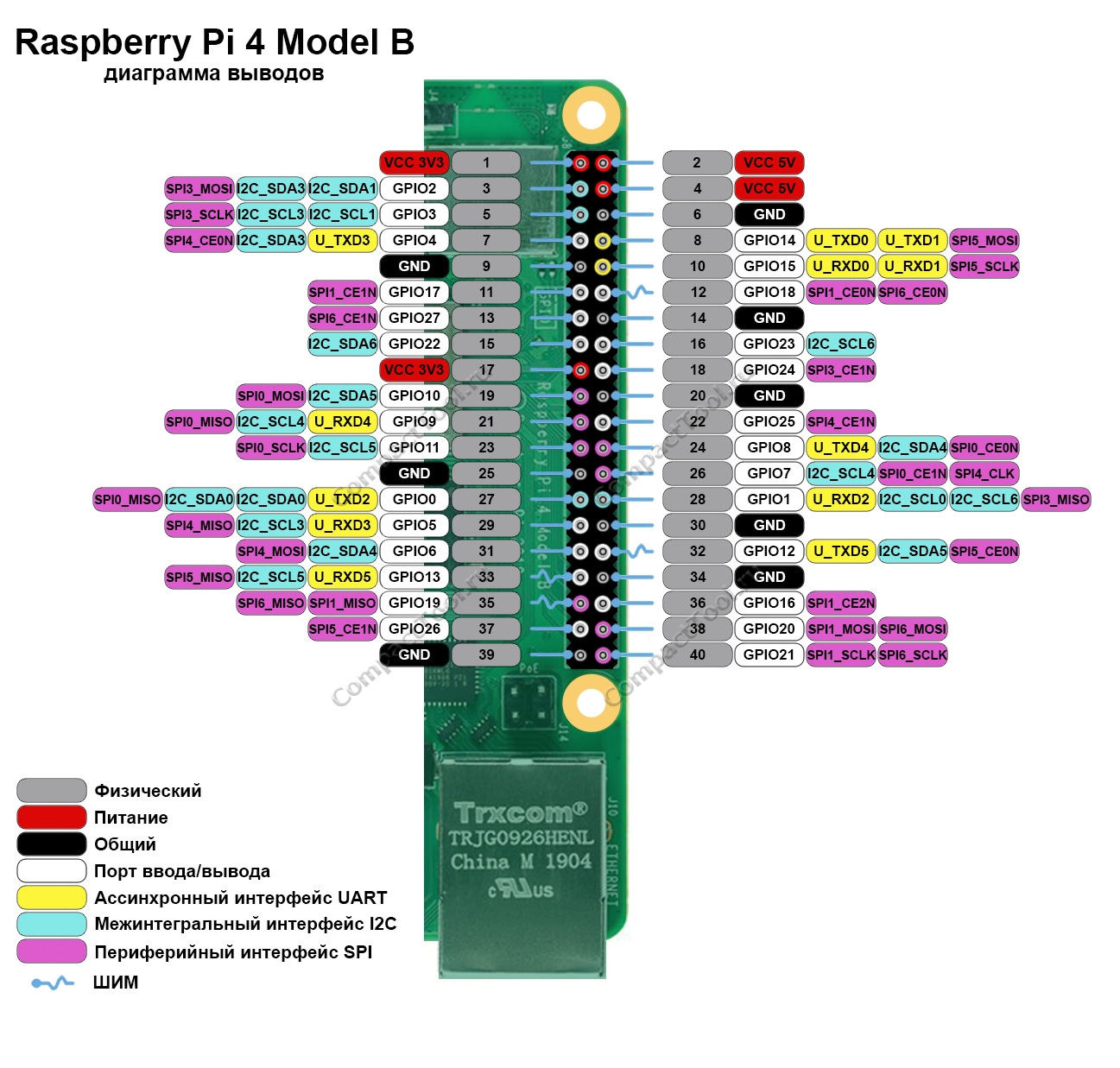
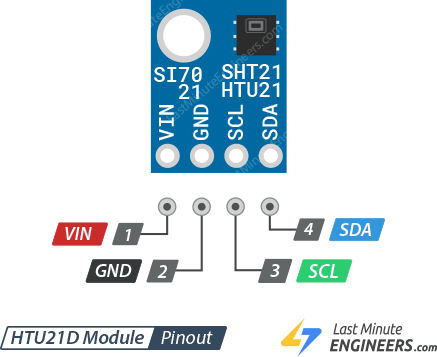
📍 Wiring Table
| HTU21D | Raspberry Pi 4 |
|---|---|
| VCC | 3.3V |
| GND | GND |
| SDA | GPIO2 (SDA) |
| SCL | GPIO3 (SCL) |
🚀 Deployment Guide (From Scratch)
📥 1. Clone the Repository
git clone http://<GITEA_SERVER>/<USER>/<REPOSITORY>.git
# Downloads the project from the server

cd <REPOSITORY>
# Enters the project folder
🧰 2. Install Dependencies
sudo apt update
# Updates package list

sudo apt install gcc i2c-tools libi2c-dev nginx git
# Installs compiler, I2C tools, web server, and Git
⚙️ 3. Enable I2C
sudo raspi-config
# Opens Raspberry Pi configuration menu
Go to:
Interfacing Options → I2C → Enable
sudo reboot
# Restarts system to apply changes
🔍 4. Verify Sensor
i2cdetect -y 1
# Scans I2C bus for connected devices
Expected:
0x40
🧑💻 5. Compile the Sensor Program
cd sensors/HTU21D
# Move to sensor source code

gcc main.c htu21d.c -o HTU21D -li2c
# Compiles the program and links I2C library
📂 6. Deploy Web Files
sudo cp -r ~/basic-ui-dashboard/* /var/www/html/
# Copies project files to Nginx directory
sudo mkdir -p /var/www/html/data
# Creates folder for JSON output
🔐 7. Set Permissions
sudo chmod +x /var/www/html/sensors/HTU21D/HTU21D
# Allows execution of sensor program

sudo chown -R www-data:www-data /var/www/html
# Gives Nginx access to files
▶️ 8. Run Sensor Loop
cd /var/www/html
# Go to web directory

while true; do ./sensors/HTU21D/HTU21D > data/HTU21D.json; sleep 5; done
# Continuously updates JSON every 5 seconds
🌐 9. Start Nginx
sudo systemctl start nginx
# Starts web server

sudo systemctl enable nginx
# Enables auto-start on boot

sudo systemctl status nginx
# Verifies server is running
🌍 10. Get Raspberry Pi IP
hostname -I
# Displays local IP address
Example:
192.168.1.100
🖥️ 11. Access from Another Computer
Open a browser and go to:
http://192.168.1.100
🔄 Real-Time Updates
JavaScript fetch:
fetch('./data/HTU21D.json?nocache=' + Date.now())
What it does:
- Prevents browser cache
- Forces fresh data request
🧪 How to Use
- Power on Raspberry Pi
- Connect sensor
- Run sensor loop
- Open browser
- Monitor values in real time
⚠️ Troubleshooting
❌ No data update
- Check loop is running
- Verify
nocachein fetch
❌ Permission denied
sudo nano /var/www/html/index.html
# Edit file with admin privileges
❌ Sensor not detected
- Check wiring
- Run
i2cdetect
📈 Improvements
- WebSockets (real-time without polling)
- Database storage
- Historical charts
- Remote access via internet
🎯 Conclusion
This project integrates:
- Embedded systems (sensor + Raspberry Pi)
- C programming
- Linux system configuration
- Web development (Nginx + JS)
It demonstrates a complete pipeline from hardware acquisition to real-time web visualization.